- DeepSeek Harness
- Agent Harness
- Cordis
- Coding Agents
DeepSeek Harness Guide: Plugin-First Agent Runtime
DeepSeek Harness is a Cordis plugin runtime with Standard, Code, and Minimal modes—what each mode loads and how to run the open-source preview.

Sherotree
·8 min read
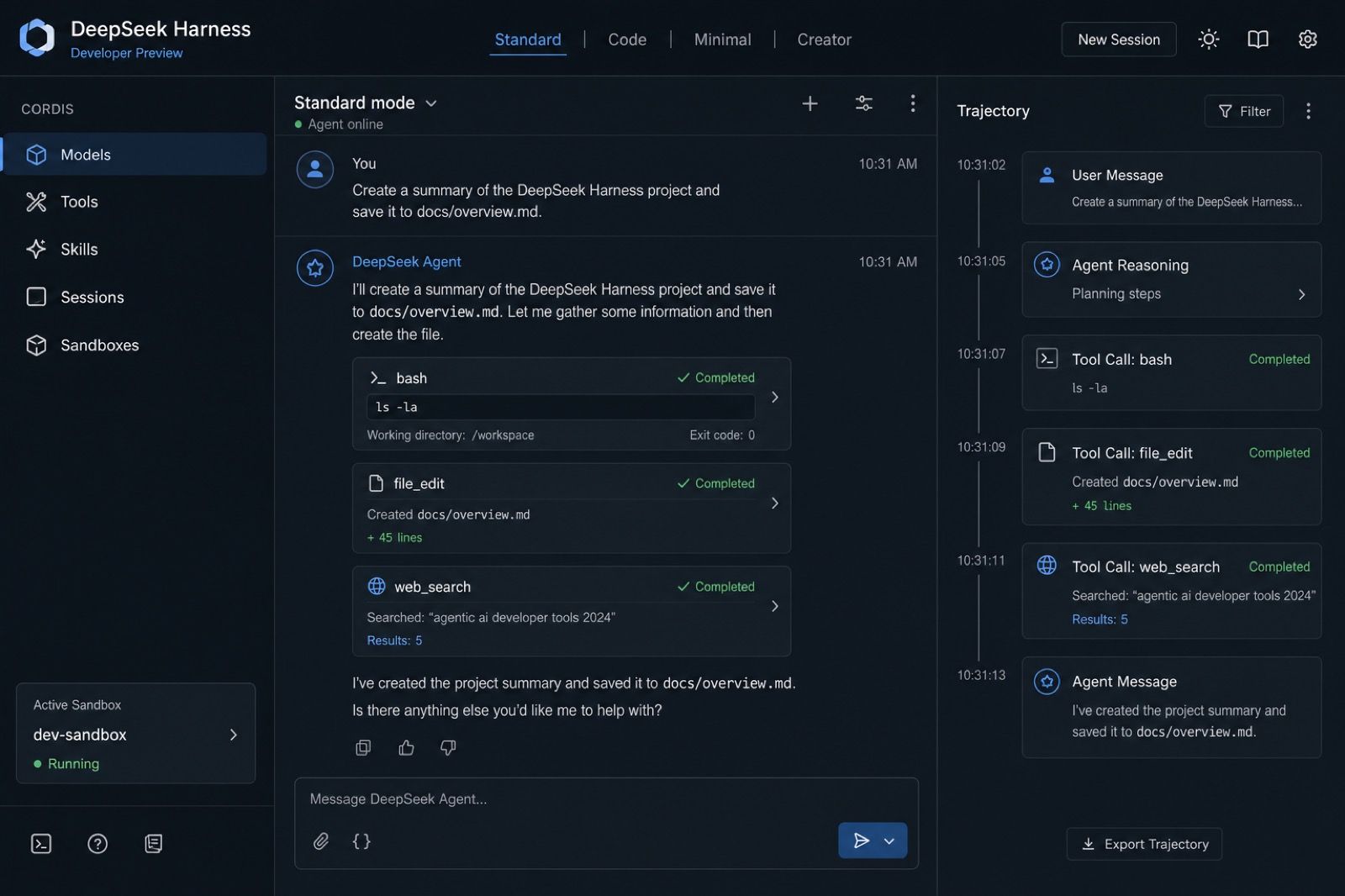
DeepSeek Harness is an open-source agent harness in developer preview. The pitch is blunt: the model is the soul of an agent, but a harness is what keeps that model working in real environments—with tools, files, sandboxes, sessions, and a UI you can actually operate.
If you are evaluating coding agents, comparing harness designs, or looking for a plugin-composable runtime instead of a sealed product, this guide covers the ideas, modes, and first-run path. For a shorter product overview with outbound links to the official site, see our curated page: DeepSeek Harness agent overview.
Official entry points:
- Product / docs hub: deepseek.com/harness
- Source: github.com/deepseek-ai/deepseek-harness
- Quick start:
npx @deepseek-ai/dsh web
Agent = model + harness
Most “AI coding” products blur two layers. The model decides what to do next. The harness decides what the model is allowed to see and touch: which tools exist, how results return, how context is injected, how long a session lives, and whether you can inspect or replay a run.
DeepSeek Harness treats that second layer as the product. Capabilities are not hard-wired into a single binary. They are plugins—models, tools, skills, sessions, sandboxes, storage, loops, scheduling, and the UI—mounted through a Cordis-based kernel. You compose a runtime with configuration instead of forking the core whenever you want a different toolset.
That design matters if you:
- Build custom coding agents for a team or research lab
- Benchmark models in a constrained tool environment
- Need auditable traces of prompts, tool calls, and injections
- Want to swap sandboxes or storage without rewriting orchestration
It matters less if you only need a daily-driver editor with chat. In that case, an AI code editor such as Cursor may be the better fit. DeepSeek Harness is aimed at people who care about the harness itself.
Everything is a plugin (Cordis)
The Cordis kernel manages plugin mounting, unmounting, and dependencies. Agent capabilities live in plugins; Cordis services and events let those plugins cooperate.
In practice, that means:
- Select the plugins you need for a mode or preset
- Swap a model provider, sandbox, or UI without changing harness internals
- Extend with community or in-house plugins as APIs stabilize
Because DeepSeek Harness is still in developer preview, treat plugin contracts as evolving. The architecture goal is stable: compose by configuration, keep the core thin, and let the ecosystem grow around Cordis. Official developer docs remain the source of truth for plugin APIs.
Every run is traceable
A second pillar of the design is an append-only session log. Everything the model sees can be recorded: system prompts, reasoning, tool calls and results, subagent scheduling, and context injections.
In Trajectory view, you inspect records by source. Resume, fork, search, and replay operate on the same event stream. That is the difference between “the agent did something opaque” and “we can reconstruct the run from one log.”
For operators, that enables:
- Debugging failed tool sequences without guessing
- Forking a promising branch of a session without replaying chat by hand
- Auditing what context was injected before a sensitive edit
- Comparing model behavior across identical harness configurations
If your evaluation workflow depends on reproducibility, prioritize Trajectory habits early—before you invent ad-hoc logging around the model API.
Runtime modes: Standard, Code, Minimal, Creator
DeepSeek Harness ships multiple runtime modes. Pick the mode that matches the job, not the mode that sounds most complete.
Standard mode
Full coding-agent surface: file editing, shell, file and web search, skills, planning, goals, subagents, and workflows. Use this when you want a capable interactive agent for real repository work.
Code mode
All Standard capabilities, with tools exposed through a Code Mode SDK. The model can combine multi-step operations in one TypeScript program instead of issuing every tool call as a separate conversational step. Use this when orchestration is the bottleneck—long chains of search → edit → test → fix that benefit from programmatic control.
Minimal mode
A two-tool coding agent: persistent bash and str_replace_editor. Use this for model benchmarking or ablation studies where extra tools would confound results. Minimal mode is not “worse Standard”; it is a controlled environment.
Creator mode
Built for authoring custom agent presets. You get Standard-mode capabilities plus runtime inspection, in-memory Cordis plugin experiments, and guidance for combining plugins into new modes. Use this when you are designing a preset, not when you are mid-feature delivery.
A practical rule: start in Standard to learn the product, switch to Minimal when comparing models, use Code when multi-step tool orchestration should live in TypeScript, and open Creator when you are packaging a reusable configuration.
How to try DeepSeek Harness
Quick start (Web UI)
- Install a current Node.js runtime
- Run:
npx @deepseek-ai/dsh web- Open the Web UI, pick a mode, and run a small task you can verify (list a directory, edit a scratch file, search the web once)
Confirm CLI flags and package names against the official harness site if the preview changes.
Install from source
When you need the full tree for plugin work:
git clone https://github.com/deepseek-ai/deepseek-harnessFollow the repository setup instructions. Source installs are better for reading Cordis wiring, experimenting in Creator mode, and contributing plugins—not required for a first Web UI session.
First-week workflow
- Run the same prompt in Standard and Minimal; note how tool availability changes behavior
- Open Trajectory after a multi-step task; identify one injection or tool result you would have missed in chat alone
- In Creator (or docs), list which plugins your preferred mode mounts
- Write down one custom preset idea (for example: sandbox-only edits + no web search) before adding community plugins
Keep the DeepSeek Harness overview handy for mode definitions while you iterate.
Who should use it—and who should wait
Good fit
- Harness and agent-platform engineers composing tools and sandboxes
- Researchers who need Minimal-style benchmarking
- Teams that require session replay and forkable traces
- Builders packaging custom presets for internal coding agents
Weaker fit (for now)
- Developers who only want inline completions in a familiar editor
- Organizations that need a fully stable, version-guaranteed enterprise SLA today (this is still a developer preview)
- Workflows that must not absorb breaking plugin API changes
MIT licensing and public GitHub access lower the cost of experimentation. Preview status raises the cost of betting production pipelines on today’s exact APIs—pin commits and isolate experiments.
DeepSeek Harness vs everyday AI editors
| Need | Lean toward |
|---|---|
| Daily editing with agent chat in a VS Code-like UI | Cursor or similar editors |
| Plugin-composable harness, modes, and session trajectories | DeepSeek Harness |
| Opaque SaaS with no local plugin kernel | Hosted coding assistants |
| Strict two-tool model evals | DeepSeek Harness Minimal mode |
These are not mutually exclusive. Many teams will keep an editor for shipping work and a harness for research, evals, or custom agent products.
Practical tips before you depend on it
- Treat preview as preview — assume Cordis plugins and public APIs will move; read changelogs before upgrading
- Prefer configuration over forks — if you are patching harness core for a one-off tool, stop and check whether a plugin slot already exists
- Log first, automate second — make Trajectory inspection part of every failed run review
- Separate eval harnesses from delivery harnesses — Minimal for benchmarks, Standard/Code for real tasks
- Document your preset — name the plugins, models, and sandbox policy so teammates can reproduce your runtime
FAQ
Is DeepSeek Harness free and open source?
Yes. The project is published under the MIT license on GitHub as deepseek-ai/deepseek-harness. Usage of third-party models or cloud APIs you connect may still incur provider costs.
How is DeepSeek Harness different from DeepSeek the model?
DeepSeek the company trains models. DeepSeek Harness is infrastructure around agents: plugins, tools, sessions, and UI. You can think of it as the environment that makes a model act as an agent in the real world.
Should I start with npx or a git clone?
Start with npx @deepseek-ai/dsh web if you want to feel Standard/Code/Minimal modes quickly. Clone the repository when you need source-level plugin work or Creator-style experiments tied to local checkout.
Can I use DeepSeek Harness as my only coding IDE?
You can attempt daily coding in Standard mode, but many developers will still want a full editor for navigation, extensions, and review. Compare against editor-first tools like Cursor based on how you actually ship code.
Where should I send teammates for a short summary?
Share the on-site curated page: DeepSeek Harness. Use the official DeepSeek site and GitHub for installs, issues, and API details.
Next steps
- Run
npx @deepseek-ai/dsh weband complete one verified file edit - Inspect that run in Trajectory view
- Retry the same task in Minimal mode and compare tool use
- Skim Deepseek Harness, then open deepseek.com/harness for current docs and community plugins
DeepSeek Harness will keep changing while it sits in developer preview. The durable idea is the one in the tagline: everything is a plugin, and every run should be reconstructable from the session log. Build around those constraints, and the shifting APIs become manageable rather than surprising.
Enjoyed this story? Share it or follow on Google.